
 In creating the original Xbox, Microsoft unwittingly helped create the single most affordable and feature packed media player of the Standard Definition age. The free open source Xbox Media Centre (XBMC) software – when coupled with a modified Xbox – sets the standard for home theatre playback.
Is the Popcorn Hour A-100 the new High Definition equivalent?
Introduction
I am a little ashamed to say it, but when a friend first mentioned the Popcorn Hour, I had no idea what he was talking about. It’s a media centre: Full HD – Plays everything – Under $200US. This sounds like one of those “Choose two” quips – but not this time.
The Popcorn Hour A-100 is a small box the size and shape of a 3.5” external hard drive enclosure that costs less than a reputable DVD player and plays back every media format known to man. Okay – Maybe that is an exaggeration, but the simple fact is that I’d go out on a limb and say that the A-100 can playback 90+% of video currently found on the Internet today.
 A Closer Look
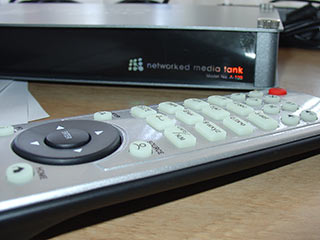
The quaint little box measures 13.5 x 27 x 4cm and is well finished with a glossy front and gunmetal grey aluminium on the top and bottom. The two side panels are made up of small metallic pieces of mesh which help keep the unit cool under load. The front panel has three indicators lights, two USB ports and the words “Network Media Tank” adorned on the front.
The top of the box features a large Popcorn Hour logo. Please be aware that when I say box I really mean small box – The unit is positively tiny compared to everything else in my TV cabinet.
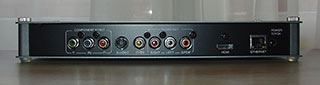
The back of the unit features an array of connections which cater for most, if not all current generation audio/video playback options: Composite, S-Video, Component, RCA Audio out, Coaxial S/PDIF and HDMI. The Popcorn Hour A-100 also features an Ethernet port for streaming videos (and more) as well as a fairly standard 12V/3A plug port.
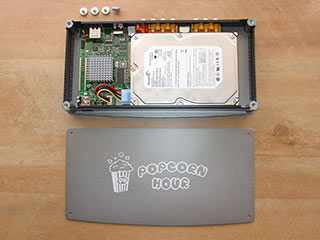
Amazingly, the inside of the A-100 is mostly empty space. A small circuit board shows off its compact design with the main chip cooled via a heat sink. The Sigma Designs SMP8635 is arguably the number one video playback chip on the market today. It is also important to note that there are no fans in the A-100, making it perfectly silent during operation – With one, albeit large caveat which I will reveal a little later.
The A-100’s interior appears far too spacious until you realise there’s an IDE connector off to one side, along with the screw holes needed to affix the drive.
So, let’s recap: The A-100 is a small box that can playback squillions of file formats (right up to 1080p), comes in a tiny form factor, can fit a 3.5” hard drive within it, has digital audio out, HDMI output, an Ethernet port and two USB ports.
But wait.. there’s more.
The A-100 can be used as a NAS drive, Bittorrent download box, online media (YouTube, etc.) player and even a DVD player when a compatible external USB DVD-ROM drive is attached.
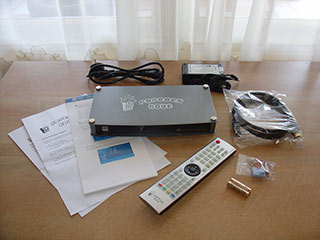
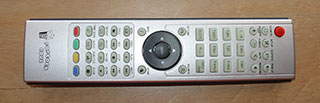
In the box, the A-100 is accompanied by a quick start guide, a few introductory notes, a fairly hefty looking HDMI cable, a remote control, two AA batteries, an internal PC power connector converter cable and a universal Power brick with US cord.
Wow.
 Interface
After unpacking the unit, I hurriedly found an old power cable lying around (the unit ships with a /non Australian/ cable) and plugged the unit in. In complete silence, the A-100’s opening screen appeared on my old SD television: A full colour Popcorn Hour logo with some text recommending I back up my hard drive regularly. Not confidence inspiring, but valued information I suppose.
It is at this point that I realised the unit has no ON/OFF button. The unit can be put into a stand-by mode via the remote which switches off all video output, but retains power so that the NAS/Bittorent functionality can continue to operate while the unit is turned off.
After a few more seconds, the unit become interactive with its white on blue user interface. The interface is plain but generally functions well. I say plain because I’m inevitably comparing the interface to XBMC. The fluent and intuitive Project Mayhem III skin of XBMC has had many years to mature and is just about perfect. In comparison, the A-100’s interface is plain and simple. Having now used the A-100 for two months, I can happily say the interface does get the job done, albeit without any frills or glossy thumbnails.
The A-100s menu system is again, simple but generally intuitive. The setup menu allows you to configure most things you would expect in a box of this kind, including how digital audio is handled (analogue or optical output), network settings, etc.
Usage
I had little problem setting up the A-100 so that it was able to access my existing network shares but found an annoying flaw in its network implementation. The firmware shipped had no provision to store network passwords for future use. And here is where the rose coloured glasses lose focus, somewhat.
The network saving issue was one of many small niggly things that annoyed me during testing. While I understand that the latest firmware iteration fixes this issue – and the Popcorn team need to be commended for their regular updates – The A-100’s operation two months in, feels a little unfinished. Not enough to put me off the machine, but enough for me to vocalise my open annoyance at this “always in beta” mentality technology companies seem to have adopted these days.
After I installed a 750GB 3.5” drive and began loading it up with videos to test I came across the second major annoyance – Due to a bug, the unit was unable to spin down the hard drives. Some may argue that this isn’t such a big deal, but with no /off/ button, the drive would be running 24/7.
While I understand this has also been fixed with updated firmware, I found the A-100 with an internal drive installed to be far too loud and too hot to be a worthwhile proposition. With a hard drive installed, the temperature of the A-100’s lid was very hot – too hot for my liking – and the vibrations it caused produced a horrible humming sound throughout my living room.
After removing the drive, the unit returned to its cool and completely silent operation. While this meant a loss of Bittorrent and NAS support, I felt this was the best course of action. If you were to install a drive in this device, I would recommend an expensive (and near silent) media drive or better yet, with some slight modifications, a low RPM 2.5” laptop drive which should reduce heat and noise.
In any case, I quickly found streaming videos over my home network worked so well, that installing an internal drive seemed redundant.
 Video Playback
We’ve had the Popcorn Hour for about two months and in all our tests – we’ve tried at least two hundred different videos of various formats, codecs and resolutions – only five files refused to play properly. And in all five cases, it appears that the files themselves had issues. Two refused to play on our codec rich PC and upon closer scrutiny, the other two appear to have had VBR (audio) issues. The final problematic file refused to play because the audio was not interleaved properly.
The best way to sum up our playback test results is to say that we found it incredibly hard to get the Popcorn Hour to not playback our files. 720p, 1080p. All flawless. AC3 – no problem. This goes for playback from an internal drive, external USB drive (connecting a generic USB drive via USB), streamed via wired Ethernet or even via external USB DVD-ROM drive.
In a bit of cross-reviewing I connected the USB Geek DVD-ROM drive via single USB cable and the A-100 happily played back region free DVD content from it.
The image quality was excellent bar a strange contrast issue. When initiating playback, the A-100 seems to adjust the contrast, /lightening/ the image as it displays a short “buffering” message. This new brightness is retained during playback washing the picture out somewhat. Adjusting the image to reduce the contrast – using my TVs “cinema” button – completely cured the problem, but one can’t help to think that this is yet another annoyance that should/will eventually be rectified in a future firmware release.
Beyond this contrast issue, the picture was stunning, with bright colours and incredible detail. To once again use XBMC as a baseline, old videos which looked mildly blurry on the Xbox looked much brighter and sharper using the Popcorn Hour. While it pains me to say it, in picture quality terms, the A-100 left XBMC for dead. In fact, it left me wondering how much use my Onkyo DVD player would be getting in the future!
All content played back incredibly smoothly and no matter how complicated a scene we could throw at it, the A-100 produced silky smooth 1080p playback. And that is the thing about this unit – Basic video playback of all formats was simply breathtaking. Upscaling of lower resolution content was also excellent. In picture quality terms, the A-100 easily put much more expensive equipment to shame.
 The Beta Blues
As stated above, the unit’s output quality is excellent – I’d say exemplary. Where the A-100 drops off this mark is quite literally everywhere else. Now this isn’t to say everything else is rubbish – It’s not – and not by a long shot – but when compared to the breadth and quality of video playback, everything else feels somewhat unfinished. One way to look at it is that all development was put into playback first and foremost, to the detriment of interface, bug free functionality, etc.
• When initiating playback, the A-100 buffers content which grates a little – particularly when buffering 1080p content over its 10/100T Ethernet connection. While bearable, the A-100 would benefit from a Gigabit connection.
• Fast forwarding and reviewing content is unavailable with higher resolution video and subtitle support, while improving with each firmware update, is really not 100% complete as at the time of writing.
• As I’ve already mentioned, the interface is lacklustre and should really allow for skinning or at the very least, the use of custom/content generated thumbnails.
• The A-100 is unable to read within RAR files or create and recall bookmarks for all file formats. Again, these are both throw-backs to XBMC which works so well.
Of course, these complaints are really matters of polish. Would I trade these imperfections for a reduction of codec/file format support or lower image resolution/quality: Of course not, and that is the real kicker.
In this reviewer’s opinion, despite its annoyances, the A-100 is currently the most affordable and best game in town.
Specifications
Connectivity
- Bonjour
- UPnP SSDP
- DLNA
- Windows Media Connect
- Windows Media Player NSS
- SMB
- NFS
- HTTP servers: myiHome, WizD, SwissCenter, MSP Portal, Llink, GB-PVR
- BitTorrent P2P
- NAS access : SMB, NFS, FTP
Web services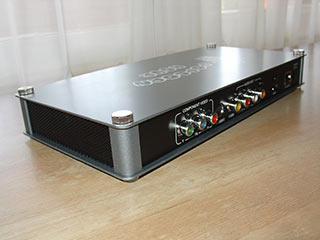
- Video : YouTube, Google Video, MetaCafe, VideoCast, DL.TV, Cranky Geeks
- Audio : iPodcast, Radiobox, ABC News
- Photo : Flickr, Picasa
- RSS feed : Yahoo! Weather, Yahoo! Traffic alerts, Yahoo! Stock, Cinecast, Traffic Conditions.
- Peer-to-peer TV : SayaTV
- Internet Radio : Shoutcast
Media files supported
- Video containers:
- MPEG1/2/4 Elementary (M1V, M2V, M4V)
- MPEG1/2 PS (M2P, MPG)
- MPEG2 Transport Stream (TS, TP, TRP, M2T, M2TS, MTS)
- VOB
- AVI, ASF, WMV
- Matroska (MKV)
- MOV (H.264), MP4, RMP4
- Video codecs:
- XVID SD/HD
- MPEG-1
- MPEG-2
- MP@HL
- MPEG-4.2
- ASP@L5, 720p, 1-point GMC
- WMV9
- MP@HL
- H.264
- VC-1
- MP@HL
- AP@L3
- Audio containers:
- AAC, M4A
- MPEG audio (MP1, MP2, MP3, MPA)
- WAV
- WMA
- Audio codecs:
- WMA, WMA Pro
- AAC
- MP1, MP2, MP3
- LPCM
- Audio pass through : DTS, AC3
- Photo formats : JPEG, BMP, PNG, GIF
- Other formats: ISO, IFO
- Subtitle formats : SRT, SMI, SUB, SSA
DRM
- Cardea DRM (WMDRM-ND)
Chipset
- Sigma Designs SMP8635
Memory
- 256MB DDR SDRAM, 32MB Flash
Audio/Video outputs
- HDMI v1.1 (up to 1080p)
- Component Video (up to 1080p)
- S-Video
- Composite Video
- Stereo Analog Audio
- S/PDIF Coax Digital Audio
Interface
- 2x USB 2.0 host
- Parallel ATA
Network
- Ethernet 10/100
Power
- 12V DC, 3A
Dimension
- Width 10.5″(270mm) x Depth 5.25″ (132mm) x Height 1.25″ (32mm)
Weight
- 2.2 lbs (1Kg)
Package Content
- NMT A-100 (HDD not included)
- 100~240V Power Adapter and 3 Prong Flat US Power Cord
- 1.5M length HDMI cable
- Remote Control with 2 “AAA” batteries
- Quick start guide
 Conclusion
The Popcorn Hour A-100 is one of the new breed of hardware devices which looks as if it will forever be in beta. While the firmware has already been updated since we received our unit – and solved some issues – it isn’t complete. And I suspect it will never be.
The A-100’s video playback is superb and I’d rate the firmware as 90%+ complete in this area. Some notable caveats are fast forwarding HD content as well as some minor subtitle issues. Decoding of video and general playback of common video formats found on the internet, however, is excellent – The best I have ever seen.
The features and general user Interface however is a little undercooked. Annoyances like not being able to remember network passwords, plain interface, lack of skinning or thumbnail support, etc. suggests the firmware is far less complete in this regard. Having said this, I found our review unit to be generally stable, with a remove the power cord reset being required only a handful of times.
Despite all these misgivings, I am totally sold on the unit – While making it look nice and making it run bug free are things all hardware should do out of the box, the reality is this unit is here to playback video – and this it does very well.
Add to this a little faith that the Popcorn Hour people will slowly weed out these annoyances with continued regular firmware updates and the A-100’s value is unbeatable.
Do I miss XBMC: Yes. But watching movies in 1080p with zero slowdown or pixelation issues trumps glossy icons and reading within RAR files every time.
Sorry team XBMC, but the king is dead. Long live the King.
The Popcorn Hour A-100 is available for purchase directly from the Popcorn Hour website for $179US.
|
+ |
– |
|
|