
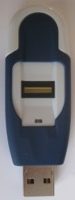
 The nTegrity Professional is a USB thumb drive with fingerprint authentication, providing a secure partition for hosting applications and storing data. DigitalReviews have been trying to review the nTegrity Pro for a while. It is a pleasure to be able to finally bring this review to our readers. Many thanks to the generous and helpful staff at nTegrity, let’s see how the product performs.
First Impressions
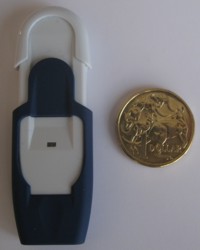
 The nTegrity Professional is a thumb drive of average physical size. The two tone white and blue finish incorporates a sliding cover to protect the fingerprint reader. A tiny click denotes that the cover is closed and "locked". It takes a more than a gentle push to open the cover and expose the USB port and fingerprint reader.
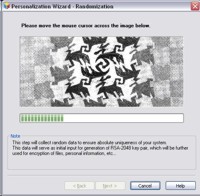
The initial installation is straightforward, no drivers required on a Windows XP OS. The first time the device is plugged in the setup wizard is launched automatically guiding the user through the process of configuring the nTegrity. Once the obligatory license agreement is accepted, the wizard prompts for randomisation input as part of the key generation process. A progress bar shows how much random data has been collected.
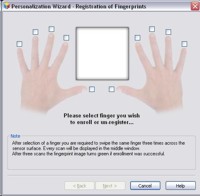
Next it is time to enrol your finger(s). The nTegrity Professional has the option of enrolling from one up to ten fingers. I resist the temptation to say all ten fingers as I have known people with less and more! Enrolment is a matter of swiping your finger across the reader when the blue LED is flashing ready. The onscreen dialog box will indicate how successful the swipe is. It requires three good passes to successfully enrol each finger.
 On top of the biometric authentication, there is a password backup. A real-time password quality meter indicates the strength of the password as it is entered. There is some smarts built into the application as a simple password requires a much longer string to be of equivalent quality than a shorter complex password.
nTegrity In Action
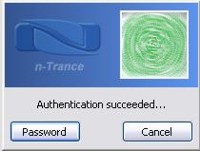
The nTegrity launches the n-Trance authentication module automatically for those with autoplay turned on. Like other USB keys with security functionalities, it requires two drive letters – one for the read only partition and a second for the writeable partition. As a result, the actual useable space will always been slightly less than advertised. In this case the read only partition consumes only 3 Mb of space. There is an additional utility partition of 4 Mb in size for firmware backup and restores.
The blue LED indicator flashes to indicate when the nTegrity is ready to authenticate. If for some reason the biometric module does not authenticate, there is an option enter the password instead. There are some caveats and issues with the authentication module which will be discussed in the "Gripes" section later.
The vendor does not make any claims on the transfer speed of the nTegrity. My quick testing indicates that it is not going to break any land speed records. Transferring a group of 1300 files ranging from 5 kb to 9 Mb in size totally 550 Mb took almost 30 minutes. Whereas a single large file of the same size took about 4.5 minutes.
Applications
Portable applications are easy to come by these days, allowing users to carry their bookmarks, emails etc on their USB key without being tied to a particular machine. In the case of "secure thumb drives", these applications tend to be bundled and have the added security of not leaving traces of your actions on the host machine.
 The nTegrity comes with My Internet Explorer, Thunderbird, Miranda and Skype as portable applications. Unique to nTegrity’s secure drives are nCrypt-EVD and nPass.
nCrypt-EVD is the Encrypted Virtual Disk application. It works by creating a file which can then be mounted as a regular disk drive, or encrypt an entire device. The application gives a decent overview with an easy to follow 5 steps wizard to get you on your way.
nPass is the identity manager which will securely store, manage and autofill your credentials into various applications. Unlike many other similar software that I have used in the past, nPass displays and captures the graphical interface instead of the plain text fields.
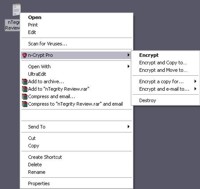
In addition to storing your credentials, nPass can store the credentials of your contacts along with their public keys. This enables the nPass to encrypt files using your contacts’ public keys, which can be done by a simple right click over the file.
The ability to securely destroy a file on deletion is handy for those who are security conscious.
Encryption
 The cryptography algorithm is the very heart and soul of any security products. In the case of the nTegrity Professional the user has a choice of six algorithms, these being: AES, Triple-DES, Twofish, Blowfish, CAST5, Serpent and GOST. In a breath of fresh air a brief explanation of each method is provided as you make your selection. Whilst this may mean very little to the average computer user, someone with a little more technical knowledge would appreciate the quick blurb provided. nTegrity clearly states at the end of each blurb their implementation of each algorithm.
Other Information
Currently the nTegrity has support only for Windows 2000, XP, Vista and Server 2003. There was no indication as to either support is for 32 bit only or includes 64 bit as well. The nTrance website is pretty bare bones at least for the masses, but if you use the bundled version of My Internet Explorer there is support information and firmware updates.
They are a few fine tuning options available buried within the options menu of the nTegrity. These include ability to destroy all data onboard after a preset number of failed authentication attempts, requirements to have both fingerprint and password authentications to unlock the drive amongst other features.
Gripes
 There are a few quirks to the nTegrity device, none of which are fatal in my view although one is particularly annoying.
The authentication module takes 15 – 25 seconds to become available once the USB drive is connected.
A number of times, particularly when a machine is busy, the authentication module would not register a fingerprint scan. The blue LED on the device will stop flashing but the authentication module sits there waiting input.
If a fingerprint swipe returns a fail code, clicking on the "password" button to manually entice password results in an immediate password failure. To get around it requires cancelling the authentication altogether and starting the process from scratch.
Writing speed was average.
Closing the nPass window invariably freezes my machine for a few seconds.
It bugged me just a little bit that I had to create an account to login to the nTrance website that I can only access with a nTegrity USB key. Without an account I had no access to any support information.
Specifications
 Weight 20g
Operation Temperature -30°C to +70°C
Power supply No external power supply, USB powered
Interface USB 2.0 High Speed (USB1.1 compatible)
Fingerprint Sensor Swipe-type, 508 dpi
9.6mm x 0.8mm sensing area
Matching Performance
FAR 0.001%
FRR 0.1%
Matching time < 250ms (30-50ms typical)
Conclusions
If you can live with the shortcomings that I documented in the Gripes section above, then the nTegrity Pro is a competent product. In particular the nPass component has a few useful features such as the encryption ability, credential management, contact management (for encryption) and VPN credentials and site management.
The nTegrity comes with a lanyard and a one meter USB extension cable for the times when your only available USB port is at the back of your machine. This works fine for a notebook but will be more challenging for a desktop under a desk.
The nTegrity range comes in nTegrity Classic and Pro flavours. A handy comparison chart is available here. Prices range from USD$89 for the 1Gb Classic to USD$219 for the 16Gb Pro, distributors are listed here.
Additional note, n-Pass Pro is available as a standalone software installation for both PC and USB drives. Trial versions are available here.